 NVIDIA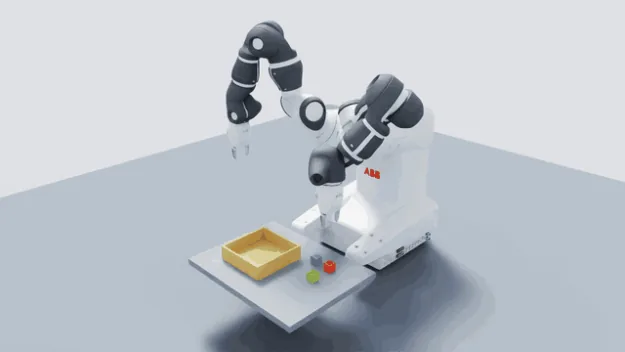
NVIDIA published a five-step workflow for converting CAD assets into simulation-ready OpenUSD assets for robotics, using Omniverse libraries, SimReady Foundation specifications, and agentic AI skills. The demonstration uses an ABB YuMi robot imported from STEP files, with GPT-6 Astra as an example frontier AI model that writes Python code to call Omniverse tools at each stage.
The workflow targets developers who need more than geometry conversion. A robot model can look correct but fail in simulation if it lacks collision geometry, joints, or mass properties. Missing collision geometry lets objects pass through grippers, and incorrect joints prevent coordinated motion. Mass and friction directly affect grasp stability.
The five steps
Step one imports the robot from STEP files into Isaac Sim, including both grippers positioned at mounting points. The agent uses the CAD-to-SimReady skill and reference images to guide conversion. Step two matches visual appearance by comparing the imported asset against ABB reference images and videos, adjusting colors, metallic response, and roughness while preserving CAD geometry. Material settings are visual estimates without measured reconstruction.
Step three configures physics properties for both arms and grippers. The agent retrieved a public URDF to identify joint axes and the zero configuration. Per-link masses were estimated from STEP geometry volumes and normalized to manufacturer totals: 38 kg for the robot and 0.28 kg per gripper. Centers of mass assumed solid parts of uniform density, without modeling motors or wiring. Contact properties assumed static friction of 0.8, dynamic friction of 0.6, and zero restitution. These parameters were not calibrated against physical measurements.
Step four validates the asset against SimReady requirements, checking units, geometry, materials, rigid bodies, joints, drives, articulation, and runtime behavior. Step five runs a pick-and-place task in Isaac Sim with both arms and grippers, completing four cycles with colored cubes and a Sharpie marker modeled from a reference image, demonstrating grasp, hold, transfer, and release without attachment joints.
What it means for model servers
For engineers serving models, the workflow shows how frontier AI models can reduce manual asset preparation by interpreting reference materials and calling Omniverse tools. The agent writes Python code that invokes Isaac Sim's remote Python server, letting it interact with a live simulation application. The workflow requires launching Codex CLI inside the Isaac Sim directory so the agent finds necessary skills.
NVIDIA notes the workflow applies across many models and robot systems, not just the YuMi example. Camera-based perception can be added in a separate workflow. The SimReady Foundation repository provides specifications and validation guidance, and Isaac Sim 6.1 ships with simready-foundation-tier-core. The CAD-to-SimReady skill offers agentic guidance for CAD conversion, material assignment, and physics configuration.
Sources & references
NVIDIA: 5 Steps to Create SimReady Assets for Robotics with Frontier AI Models ↗Source consulted: 2026-10-14
 Apple
Apple